原创声明:本文为雪天前端原创技术文章,未经授权禁止转载、搬运
考虑到兼容性,源码使用的是vue2语法,没有任何依赖库,没有使用CSS 预处理器。直接一键复制就可以了。
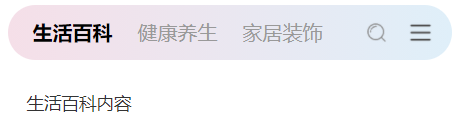
标准顶部 Tab,左侧文字切换,右侧带搜索图标 + 更多图标,渐变柔和背景,适合资讯、首页等通用场景。
<template>
  <view class="page-wrapper">
    <view class="tab-container tab-container-1">
      <view class="tab-list">
        <view v-for="(item, index) in tabList" :key="index" class="tab-item"
          :class="{ active: currentIndex === index }" @click="switchTab(index)">
          {{ item.name }}
        view>
      view>
      <view class="tab-right">
        <view class="icon-item">
          <image class="icon-img" src="/static/xt-tabs/searchIcon.png">image>
        view>
        <view class="icon-item">
          <image class="icon-img" src="/static/xt-tabs/more.png">image>
        view>
      view>
    view>
    <view class="content-container">
      <view v-show="currentIndex === 0">生活百科内容view>
      <view v-show="currentIndex === 1">健康养生内容view>
      <view v-show="currentIndex === 2">家居装饰内容view>
    view>
view>
template>

<script>
exportdefault {
    data() {
      return {
        tabList: [{
            name: '生活百科'
          },
          {
            name: '健康养生'
          },
          {
            name: '家居装饰'
          }
        ],
        currentIndex: 0
      }
    },
    methods: {
      switchTab(index) {
        this.currentIndex = index
      }
    }
  }
script>

<style scoped>
.page-wrapper {
    width: 100%;
    min-height: 100vh;
    padding: 20rpx;
    box-sizing: border-box;
  }

.tab-container {
    display: flex;
    align-items: center;
    justify-content: space-between;
    padding: 020rpx;
    height: 88rpx;
    border-radius: 44rpx;
    margin-bottom: 20rpx;
    background: linear-gradient(to right, #f5dfe8, #dfeff9);
  }

.tab-list {
    display: flex;
    align-items: center;
    flex: 1;
    overflow-x: auto;
    white-space: nowrap;
  }

.tab-item {
    font-size: 32rpx;
    font-weight: 500;
    color: #999;
    padding: 020rpx;
    line-height: 88rpx;
    position: relative;
    transition: all 0.3s ease;
    flex-shrink: 0;
  }

.tab-item.active {
    font-weight: bold;
    color: #000;
  }

.tab-right {
    display: flex;
    align-items: center;
    gap: 10rpx;
    flex-shrink: 0;
  }

.icon-item {
    width: 60rpx;
    height: 60rpx;
    display: flex;
    align-items: center;
    justify-content: center;
  }

.icon-img {
    width: 40rpx;
    height: 40rpx;
    object-fit: contain;
  }

.content-container {
    padding: 30rpx;
    font-size: 28rpx;
    color: #333;
  }
style>
原创声明:本文为雪天前端原创技术文章,未经授权禁止转载、搬运
浅灰色清爽背景,右侧仅保留搜索图标,选中项底部红色小横条,简洁高级,适合内容分类、社区页面。

<template>
  <view class="page-wrapper">
    <view class="tab-container tab-container-2">
      <view class="tab-list">
        <view v-for="(item, index) in tabList" :key="index" class="tab-item"
          :class="{ active: currentIndex === index }" @click="switchTab(index)">
          {{ item.name }}
        view>
      view>
      <view class="tab-right">
        <view class="icon-item">
          <image class="icon-img" src="/static/xt-tabs/searchIcon.png">image>
        view>
      view>
    view>
    <view class="content-container">
      <view v-show="currentIndex === 0">国内旅行内容view>
      <view v-show="currentIndex === 1">国外旅行内容view>
      <view v-show="currentIndex === 2">城市漫步内容view>
      <view v-show="currentIndex === 3">自然风光内容view>
      <view v-show="currentIndex === 4">人文古迹内容view>
    view>
view>
template>

<script>
export default {
  data() {
    return {
      tabList: [
        { name: '国内旅行' },
        { name: '国外旅行' },
        { name: '城市漫步' },
        { name: '自然风光' },
        { name: '人文古迹' }
      ],
      currentIndex: 1
    }
  },
methods: {
    switchTab(index) {
      this.currentIndex = index
    }
  }
}
script>

<style scoped>
.page-wrapper {
width: 100%;
min-height: 100vh;
padding: 20rpx;
box-sizing: border-box;
}
.tab-container {
display: flex;
align-items: center;
justify-content: space-between;
padding: 020rpx;
height: 88rpx;
border-radius: 44rpx;
margin-bottom: 20rpx;
background: #f5f5f5;
}
.tab-list {
display: flex;
align-items: center;
flex: 1;
overflow-x: auto;
white-space: nowrap;
}
.tab-item {
font-size: 32rpx;
font-weight: 500;
color: #999;
padding: 020rpx;
line-height: 88rpx;
position: relative;
transition: all 0.3s ease;
flex-shrink: 0;
}
.tab-item.active {
font-weight: bold;
color: #000;
}
.tab-item.active::after {
content: '';
position: absolute;
bottom: 8rpx;
left: 50%;
transform: translateX(-50%);
width: 40rpx;
height: 6rpx;
background: #ff3b30;
border-radius: 3rpx;
}
.tab-right {
display: flex;
align-items: center;
gap: 10rpx;
flex-shrink: 0;
}
.icon-item {
width: 60rpx;
height: 60rpx;
display: flex;
align-items: center;
justify-content: center;
}
.icon-img {
width: 40rpx;
height: 40rpx;
object-fit: contain;
}
.content-container {
padding: 30rpx;
font-size: 28rpx;
color: #333;
}
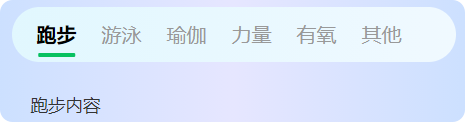
style>蓝色清新渐变背景,无右侧图标,选中项底部绿色长条指示器,醒目不突兀,适合运动、工具类页面。
<template>
  <view class="page-wrapper">
    <view class="tab-container tab-container-3">
      <view class="tab-list">
        <view v-for="(item, index) in tabList" :key="index" class="tab-item"
          :class="{ active: currentIndex === index }" @click="switchTab(index)">
          {{ item.name }}
        view>
      view>
    view>
    <view class="content-container">
      <view v-show="currentIndex === 0">跑步内容view>
      <view v-show="currentIndex === 1">游泳内容view>
      <view v-show="currentIndex === 2">瑜伽内容view>
      <view v-show="currentIndex === 3">力量内容view>
      <view v-show="currentIndex === 4">有氧内容view>
      <view v-show="currentIndex === 5">其他内容view>
    view>
view>
template>

<script>
export default {
  data() {
    return {
      tabList: [
        { name: '跑步' },
        { name: '游泳' },
        { name: '瑜伽' },
        { name: '力量' },
        { name: '有氧' },
        { name: '其他' }
      ],
      currentIndex: 0
    }
  },
methods: {
    switchTab(index) {
      this.currentIndex = index
    }
  }
}
script>

<style scoped>
.page-wrapper {
width: 100%;
min-height: 100vh;
padding: 20rpx;
box-sizing: border-box;
background: linear-gradient(90deg, #cce0ff 0%, #e6e6ff 50%, #cce0ff 100%);
}
.tab-container {
display: flex;
align-items: center;
padding: 020rpx;
height: 88rpx;
border-radius: 44rpx;
margin-bottom: 20rpx;
background: linear-gradient(to right, #e1f7fe, #f0f9ff);
}
.tab-list {
display: flex;
align-items: center;
flex: 1;
overflow-x: auto;
white-space: nowrap;
}
.tab-item {
font-size: 32rpx;
font-weight: 500;
color: #999;
padding: 020rpx;
line-height: 88rpx;
position: relative;
transition: all 0.3s ease;
flex-shrink: 0;
}
.tab-item.active {
font-weight: bold;
color: #000;
}
.tab-item.active::after {
content: '';
position: absolute;
bottom: 8rpx;
left: 50%;
transform: translateX(-50%);
width: 60rpx;
height: 6rpx;
background: #07c160;
border-radius: 3rpx;
}
.content-container {
padding: 30rpx;
font-size: 28rpx;
color: #333;
}
style>
原创声明:本文为雪天前端原创技术文章,未经授权禁止转载、搬运
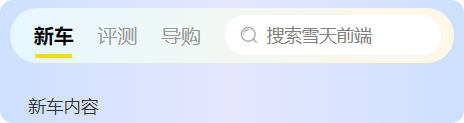
3 个 Tab 自动等分宽度、禁止横向滚动,右侧自带圆角搜索框,黄色指示器,适合工具、分类、本地生活页面。
<template>
  <view class="page-wrapper">
    <view class="tab-container tab-container-5">
      <view class="tab-list no-scroll flex-equal">
        <view v-for="(item, index) in tabList" :key="index" class="tab-item"
          :class="{ active: currentIndex === index }" @click="switchTab(index)">
          {{ item.name }}
        view>
      view>
      <view class="search-box">
        <image class="search-icon-img" src="/static/xt-tabs/searchIcon.png">image>
        <input type="text" class="search-input" placeholder="搜索雪天前端" />
      view>
    view>
    <view class="content-container">
      <view v-show="currentIndex === 0">新车内容view>
      <view v-show="currentIndex === 1">评测内容view>
      <view v-show="currentIndex === 2">导购内容view>
    view>
view>
template>

<script>
export default {
  data() {
    return {
      tabList: [
        { name: '新车' },
        { name: '评测' },
        { name: '导购' }
      ],
      currentIndex: 0
    }
  },
methods: {
    switchTab(index) {
      this.currentIndex = index
    }
  }
}
script>

<style scoped>
.page-wrapper {
width: 100%;
min-height: 100vh;
padding: 20rpx;
box-sizing: border-box;
background: linear-gradient(90deg, #cce0ff 0%, #e6e6ff 50%, #cce0ff 100%);
}
.tab-container {
display: flex;
align-items: center;
justify-content: space-between;
padding: 020rpx;
height: 88rpx;
border-radius: 44rpx;
margin-bottom: 20rpx;
background: linear-gradient(to right, #e6f7ff, #fff7e6);
}
.tab-list {
display: flex;
align-items: center;
flex: 1;
}
.tab-list.no-scroll {
overflow: hidden !important;
}
.tab-list.flex-equal.tab-item {
flex: 1;
text-align: center;
padding: 0;
}
.tab-item {
font-size: 32rpx;
font-weight: 500;
color: #999;
line-height: 88rpx;
position: relative;
transition: all 0.3s ease;
flex-shrink: 0;
}
.tab-item.active {
font-weight: bold;
color: #000;
}
.tab-item.active::after {
content: '';
position: absolute;
bottom: 8rpx;
left: 50%;
transform: translateX(-50%);
width: 60rpx;
height: 6rpx;
background: #ffdd00;
border-radius: 3rpx;
}
.search-box {
display: flex;
align-items: center;
background: #ffffff;
border-radius: 44rpx;
padding: 020rpx;
height: 64rpx;
flex: 1;
margin-left: 20rpx;
}
.search-icon-img {
width: 36rpx;
height: 36rpx;
margin-right: 10rpx;
object-fit: contain;
}
.search-input {
flex: 1;
font-size: 28rpx;
color: #333;
background: transparent;
border: none;
outline: none;
}
.content-container {
padding: 30rpx;
font-size: 28rpx;
color: #333;
}
style>
原创声明:本文为雪天前端原创技术文章,未经授权禁止转载、搬运
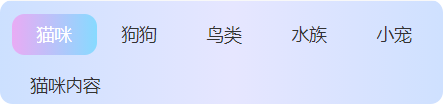
无背景设计,选中项直接变成渐变色圆角色块,颜值极高,适合宠物、社交、女性向、年轻化项目
<template>
  <view class="page-wrapper">
    <view class="tab-container tab-container-6">
      <view class="tab-list">
        <view v-for="(item, index) in tabList" :key="index" class="tab-item"
          :class="{ active: currentIndex === index }" @click="switchTab(index)">
          {{ item.name }}
        view>
      view>
    view>
    <view class="content-container">
      <view v-show="currentIndex === 0">猫咪内容view>
      <view v-show="currentIndex === 1">狗狗内容view>
      <view v-show="currentIndex === 2">鸟类内容view>
      <view v-show="currentIndex === 3">水族内容view>
      <view v-show="currentIndex === 4">小宠内容view>
    view>
view>
template>

<script>
export default {
  data() {
    return {
      tabList: [
        { name: '猫咪' },
        { name: '狗狗' },
        { name: '鸟类' },
        { name: '水族' },
        { name: '小宠' }
      ],
      currentIndex: 0
    }
  },
methods: {
    switchTab(index) {
      this.currentIndex = index
    }
  }
}
script>

<style scoped>
.page-wrapper {
width: 100%;
min-height: 100vh;
padding: 20rpx;
box-sizing: border-box;
background: linear-gradient(90deg, #cce0ff 0%, #e6e6ff 50%, #cce0ff 100%);
}
.tab-container {
background: transparent;
padding: 0;
}
.tab-list {
display: flex;
align-items: center;
flex: 1;
overflow-x: auto;
white-space: nowrap;
}
.tab-item {
color: #333;
padding: 040rpx;
line-height: 66rpx;
font-size: 28rpx;
transition: all 0.3s ease;
flex-shrink: 0;
}
.tab-item.active {
color: #ffffff;
background: linear-gradient(to right, #e9abf4, #87daff);
border-radius: 20rpx;
}
.content-container {
padding: 30rpx;
font-size: 28rpx;
color: #333;
}
style>
原创声明:本文为雪天前端原创技术文章,未经授权禁止转载、搬运
持续输出 uni-app / 小程序 / Vue 实战组件 与开发技巧,干货不断!
觉得有用记得 点赞 + 收藏 + 关注,后续更多优质组件持续更新~
大家觉得下期什么组件好,评论区见...
原创声明:本文为雪天前端原创技术文章,未经授权禁止转载、搬运
uniapp 8种高级感搜索框源码,直接复制

PC端AI聊天页面(一键复制)

uniapp AI聊天页面
流程图库logicflow

一键登录页源码
一键登录页面
grid布局
那些好用的图标网站
uniapp 小程序生成骨架屏


文章评论